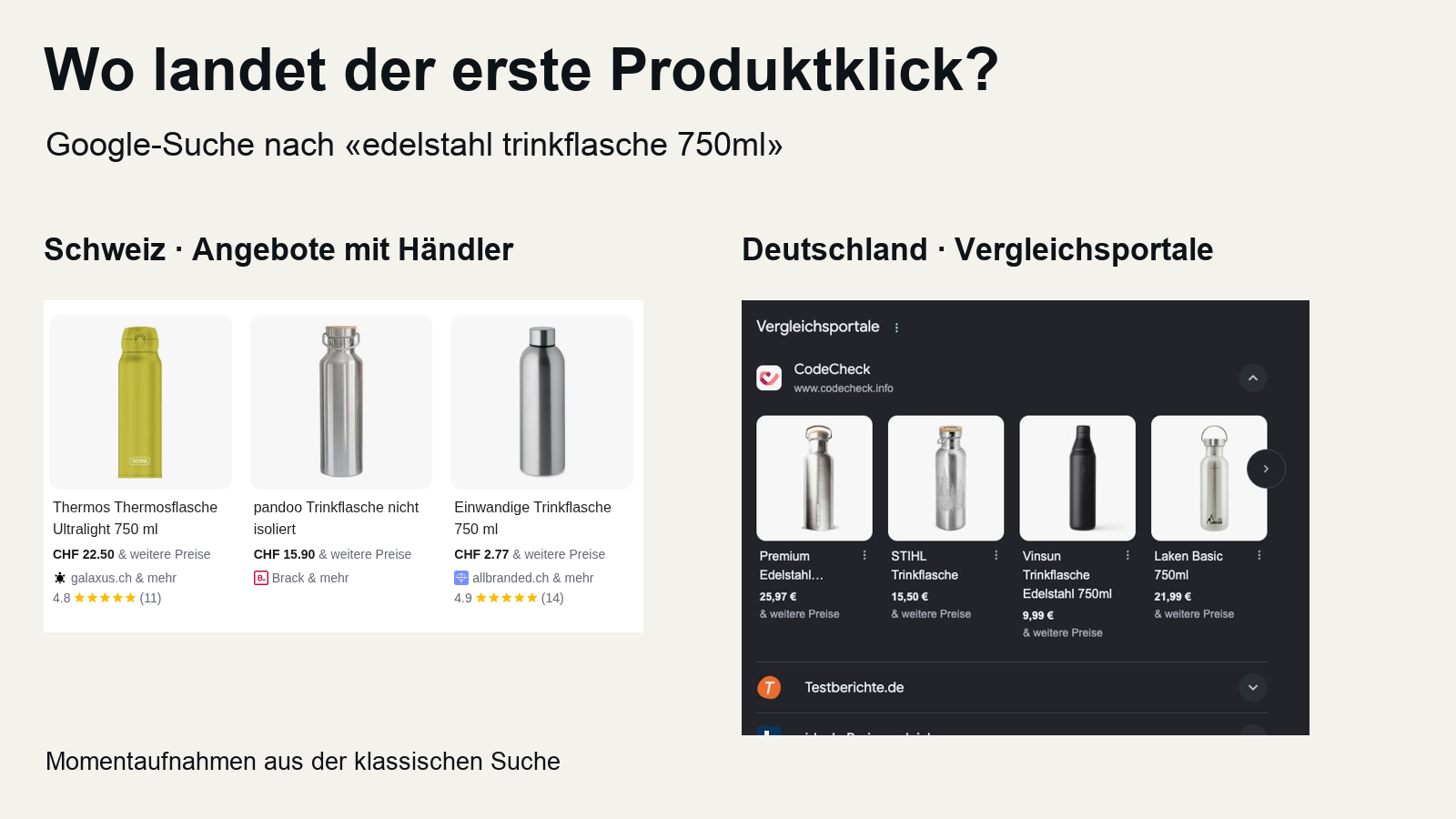
Search Google in Zurich for “edelstahl trinkflasche 750ml” (750 ml stainless steel water bottle) and you could see bottles alongside prices in Swiss francs and retailer names. In Berlin, the same words brought up offers grouped by comparison site. The difference became clear when we clicked. In Zurich, Google opened its own product view. In Berlin, we landed on Shopudio.
For a shop selling in both countries, that raises three questions. Where does my offer appear in organic search? Who occupies the first advertising slots? And what does someone see when they ask Google’s AI Mode for advice?
We used the exact German query “edelstahl trinkflasche 750ml” in all four views. We switched locations using a VPN, and Google identified Zurich and Berlin from the IP address. The screenshots show individual results from November 2026.
1. Organic search – who gets the first click?
In Switzerland, individual product cards appeared below the ads. Shoppers could compare bottles by photo, price and retailer on the results page. Some cards offered more prices. Clicking the Jet Black Bambaw bottle opened Google’s product view. The retailer was visible before anyone visited its shop.
In Germany, the same search produced a section labelled “Vergleichsportale” (comparison sites). Shopudio’s expanded panel showed a 750 ml Vinsun stainless steel bottle for €9.99. Clicking the product took us to Shopudio. The comparison site received the first visit outside Google.
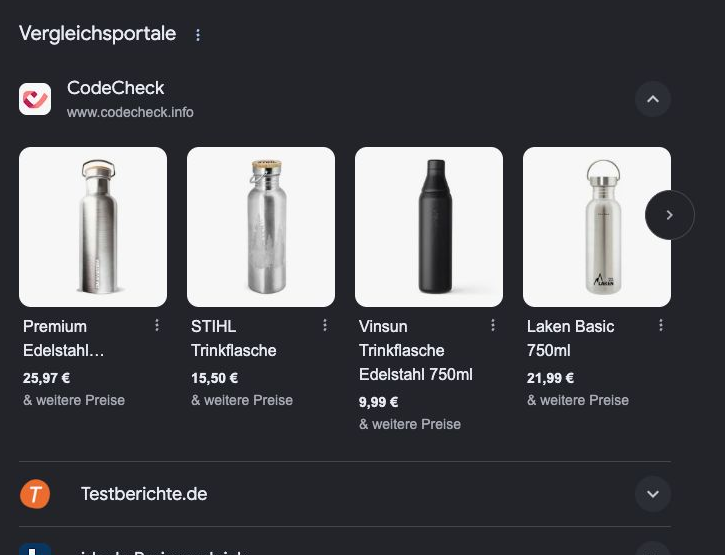
When we repeated the search in Berlin, CodeCheck’s panel was open. The screenshot shows where the click started. The portal name sits below the “Vergleichsportale” heading, above a row of products. The third card shows the €9.99 Vinsun bottle. Clicking that card opened its product page on CodeCheck. Product page reached on CodeCheck
Google documents a regional change to product searches in the European Economic Area (EEA). Dedicated sections can show comparison sites and suppliers. In September 2026, BrightEdge observed the previous organic product grid disappearing from the results it tracked across 14 EEA markets. Switzerland is outside the EEA. Google’s regional search formats · BrightEdge’s market observations
The regulatory background is the Digital Markets Act. The European Commission found that Google gave its own comparison services preferential treatment in search results. In the EEA, other services now have space to present offers directly in Search. The portal shown for an individual query can change. Our two Berlin searches featured Shopudio and CodeCheck. European Commission decision of 23 July 2026
What does this mean for SEO? For a Swiss shop, inspect the card for your important queries. Is the right variant visible? Is the CHF price accurate? Is your shop named as a seller? In Germany there is another question. Does the comparison site that appears actually carry your offer? Merchant Center remains relevant in both markets. The grid was one placement in general search, and free listings are eligible for several Google surfaces. Google on free product listings
2. Ads – what appears before the first organic result?
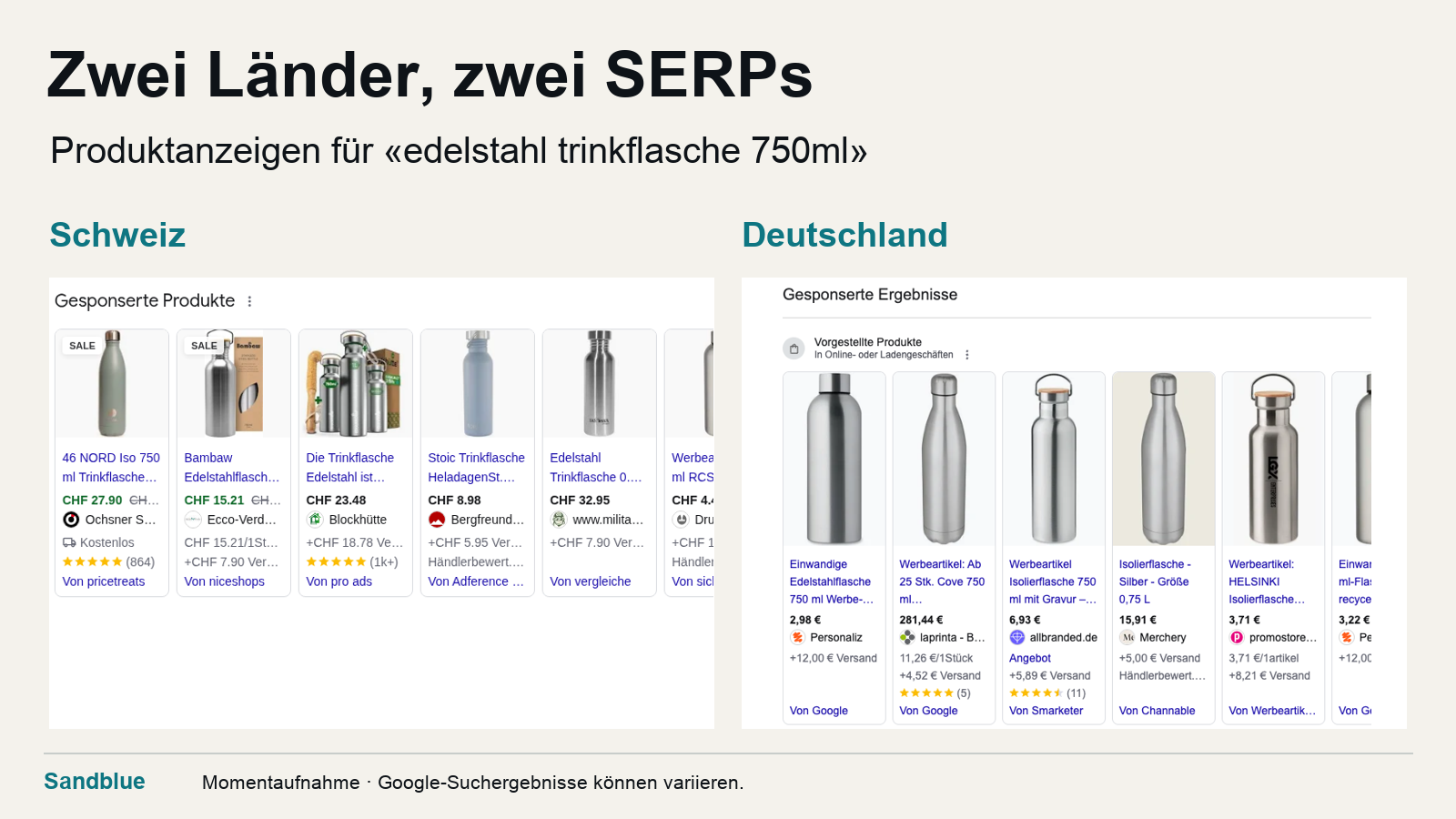
In Switzerland, advertising had a prominent position for this query. A horizontal carousel labelled “Gesponserte Produkte” (sponsored products) appeared below the navigation, with photos, CHF prices and sellers. Immediately below was a second sponsored section with text ads, including one from SIGG. Shoppers passed both formats before reaching Manor’s regular result. More text ads appeared further down.
In Germany, eight product cards with euro prices were visible under “Gesponserte Ergebnisse” (sponsored results). They included engraved bottles and offers with minimum orders of 25 or 50 units. An ordinary bottle query could put corporate merchandise on the first screen.
What does this mean for Google Ads? In the Swiss results, a shop could appear in a product ad or a text ad before the first organic listing. Record those placements when comparing competition across markets. A paid Shopping card, a text ad and an offer inside a comparison site can all feature the same bottle. Each gives the shopper a different route to it.
3. AI Mode – when does a recommendation become a product offer?
In Switzerland, AI Mode returned specific offers for “edelstahl trinkflasche 750ml”. The entry for “SIGG Shield ONE / Meridian” showed CHF 17.00 and Brack. Google listed the Bambaw bottle at CHF 14.05 from Interismo CH. Its sources included the SIGG online shop, F.A.Z. Kaufkompass and Vergleich.org.
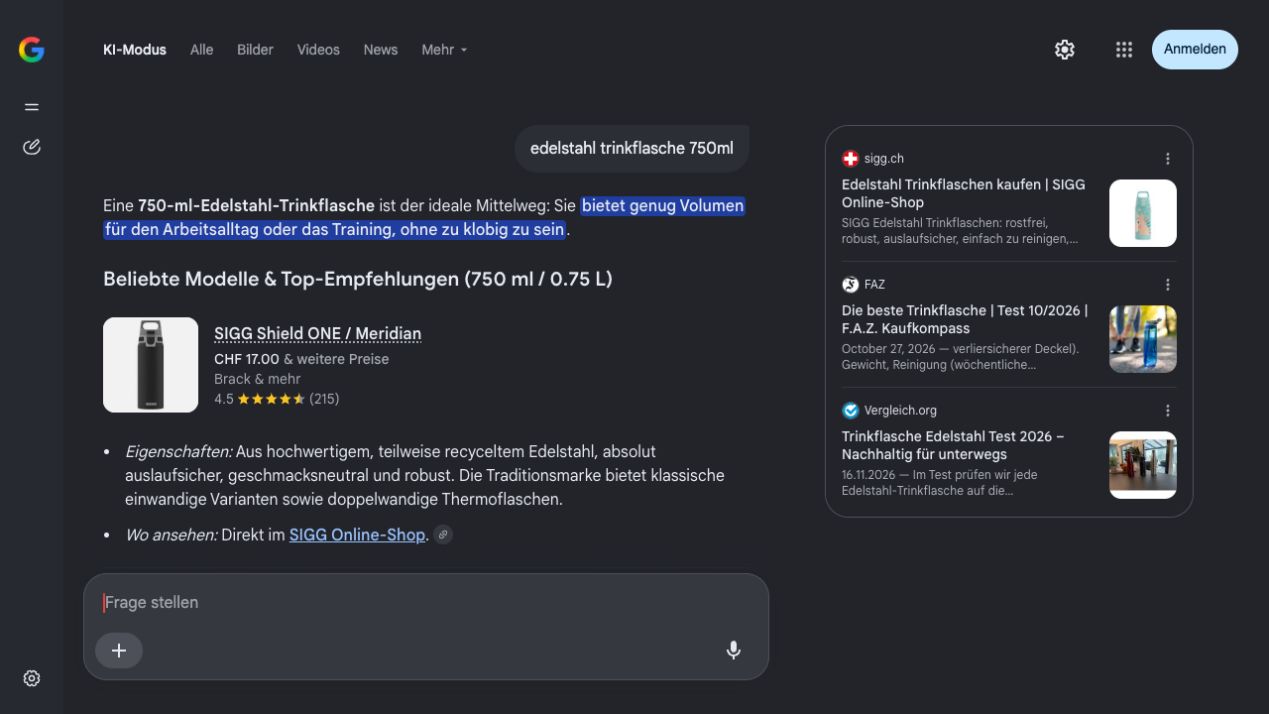
At first glance these cards resemble Shopping ads. The Swiss AI response carried no sponsored label, so we recorded the cards as organic product recommendations. Google can also place ads within or alongside an AI Mode response and labels those placements as sponsored. Google Ads on advertising in AI Mode
In Germany, AI Mode answered “edelstahl trinkflasche 750ml” with buying advice. It explained the difference between single-wall and insulated bottles and named brands including WILDBÄR, Klean Kanteen and SIGG. Sources included WILDBÄR’s product page, F.A.Z. Kaufkompass and Heimwerker.de. The completed response contained no section labelled as sponsored.
Both AI responses used the same input. Even with identical wording, the recommended models, sources and prices can change on another visit.
What does this mean for AI visibility? SIGG appeared twice in the Swiss answer, as a recommended brand and as a source. Brack was the retailer shown next to the price. Track those roles separately. Google can recommend your product while sending a potential buyer to another seller.
What can shops take from the comparison?
The clearest finding came from classic search. For the same query, the Zurich product card already named a retailer. In Berlin, the tested product click went to a comparison site. Ads occupied the first two sections of the Swiss capture. AI Mode also recommended a bottle with a price and retailer without labelling the card as sponsored.
If you serve customers in both markets, add one check to your ranking report. Search for your most important product in each country and follow the first product click. Alongside your position, you will see who presents the offer and where the shopper goes next.
Is it worth building a Merchant Center feed for free listings?
Switzerland. If your shop does not yet submit product data to Merchant Center, start with your most important variants. In Zurich the retailer and CHF price appeared alongside the bottle. Once your products are approved, check which offers receive impressions and clicks. Use those results to decide how far to expand the feed.
Germany and the EEA. I would maintain an existing feed. Free listings are also eligible for other surfaces, including the Shopping tab. If your only reason for building a new feed is to appear in product cards in classic German search, I would give that investment a lower priority. In Berlin the comparison site received the first click. Check which portals appear for your top products, whether they list your shop against the correct variant, and whether they generate orders. Google on free listings and supported markets
These results are snapshots. Even with the same query and location, the order and format can change on the next visit. We did not measure how often the formats appear or how much revenue they generate.